
Tribler v7.1.1 is out. Check it out

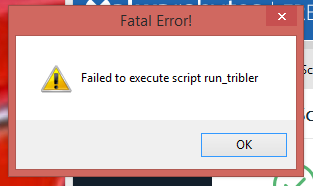
I also have the same “Failed to execute script run_tribler” error after installing v7.1.1

Tribler_7.1.1_x64.exe on Windows 7 64-bit.

v7.1.0 worked fine except for the occasional crash when running for long periods of time and the issue with torrent speeds dropping to zero and then being fine after a Tribler restart.
@LesVerres @watersource67 @krick It seems the problem is with the proxy settings. To fix the issue please remove these two lines from %APPDATA%/.Tribler/triblerd.conf

proxy_server = “”
proxy_auth = “”

They will be recreated with the new configuration setttings.

Please let us know if this fixes the issue for you.

We are investigating this issue and assigned it high priority. Please check out this GitHub issue where we track progress on this bug.

After deleting these lines, Tribler will indeed start again.

Yes, that fixed the issue. Thank you for your help.

image

@mlee Please try the above fix.

Thank you for your reply.
I have been unable to find a file named “triblerd.conf” using the Win 8.1 Search function.

@mlee We just released a new version with the fix. It is available at https://tribler.org
Please try this new version and let us know if it fixes your issue.

triblerd.conf file is located at a folder we call Tribler state directory.
You can find it by typing the following in Windows Run command:
%APPDATA%/.Tribler

I found and edited the file.
Thank you.
Tribler 7.1.1 is loading now.

1 Like

After removing the two proxy lines and installing 7.1.2 I am able to continue using Tribler again.
Thanks so much

1 Like

triblerd.conf does not exist in %APPDATA%/.Tribler/

Hi @mahdi

Do you use Windows system ? Which one ? Maybe 64bits …
What do you see inside directory “%APPDATA%/.Tribler/”.

Did you tried to install 7.2.2 (see https://www.tribler.org/) ?

Windows 10 x64 Tribler 7.2.2 x64
There is a logs folder with 3 empty log files

Hi again

I gat somes file in “%APPDATA%/.Tribler/”, and there is a “triblerd.conf” on my computer.
I gat also the directory “%APPDATA%/.Tribler/logs/”.
To see all of this, i … choose in Windows to not hide extension of each file and see even hidden files.
See for example …

Anyway, the trick explain here is only for Tribler 7.1.1 when someone gat error starting Tribler.
:face_with_thermometer:
What problem do you encounter @mahdi

I’ve unhidden them.
I have same error
Failed to execute script run_tribler.
I first had installed 7.1.5 (same error) then upgraded to 7.2.2 still same error

Ok @mahdi, maybe @S.Pan o someone else 'll find what is the problem.

i just discover debug panel with “Ctrl + d” (not really understand parameters here :smiley:).
i gat repeated lines in “%APPDATA%/.Tribler/tribler-core-error.log”, even if Tribler work.

@mahdi do you perhaps have a different python version installed. We still use python 2.7.

@owned Thank you for your assistance.

I uninstalled python. not solved. I’m using pre-build binaries