Thank you!
About the number of subscribers, it depends on other Tribler peers finding your content interesting and actively subscribing. With more time and more interesting content (may be it already is), you could get more subscribers.
I bet my contest is interesting. If i check my files (in downloads or if i search for them and find them, i see that the seeds column always shows 0 (0) while the peers column shows values like 0 (n) wile “n” is between 2 and 20. Is that normal after days of running Tribler? … As i am the only one and first who created my torrent file and actively SEEDING … shouldnt the seeds column doesnt show at least ME as seeder , which means 1 (0) or 0 (1) ???
Question regarding this: If i search my files on my own, and find them (but not the channel itself), i see on every file: “unknown health” ! wh??? i am online and actually seeding, health should be green as the files are currently 100% available, not?
For channel search, channels with no votes (subscribers) is filtered in the search results which is probably why your channel is not visible. But this behaviour will change in future releases. In fact, we’re working on a big overhaul of channel refactor.
That’s funny … how should a brandnew channel gets subscribers, when he, the channel, will not be listed until you get subscribers who at first need to FIND and SEE the channel, which is not possible because it does not get listed. Know what i mean? senseless.
By the way: For fun or testing i have added/subscribed my own channel. As i can’t find it using the search function i had to use the identifier id to be able to do so. So my channel got 1 subscriber and still dont get listed or is searchable/findable.
We have watch folder option in Settings -> General. We would like you to try it. We support torrents only.
I know, thanks, but you didnt understand (or me). As i understood the watch folder is just checking if torrent files are in it and then starts do download it, right? But i am talking about the opposite. i want a folder where i can add files and then there will be automatically created torrent files for those and seeding starts. Know what i mean?
Yes, default used ports listed 7759 & 7760 are used for peer to peer networking so that other Tribler peers can communicate with your peer. But port 8085 is different. It is only used locally for connecting Tribler core and GUI. Tribler runs core and GUI separately so this port is used for information exchange.
This confuses me now. You say default ports are 7759 and 7760 UDP and TCP. But inside the program, tribler, the standard port is set to 8085! … Oh ok, just see it, thats just made bad and causes confusions:
SETTINGS -> CONNECTION -> Port (defaults to 8085)
Thats why i thought 8085 needs to be forwarded in my router. Now i see the topic above this entry, saying “GUI/Core connection”
But as user never had to to with tribler, you should also mention at this point that 7759 and 7760 are the standard ports. Am i right? Which ports i should now forward on my router so tribler will run smooth … is 7759/7760 enough or also 8084/8065?
We are always open to suggestions on how we can improve user experience and would appreciate your feedback.
I noticed that if i am searching for a file, lets say UBUNTU, i will find a lot of files and their data and infos about it, but NOT in which channel they are ! Maybe i would be interested not only in this file but also in the whole channel.
example: I search UBUNTU and find it. Inside the file info or below the name of the file, there would be an info sensefull like “this file is listed or oart of the channel: Linux stuff” - want to check or subscribe to the channel? click here!
Know what i mean, sorry my english isnt perfect and its hard to explain thinks.
Thanks for answering and helping! 



 Just found this channel by searching for laser. This channel got only 1 (ONE) subscriber, like mine (myself), and onl got 3 (THREE) items. And it is visible and can be found on searches so more subscribers will come by time automatically.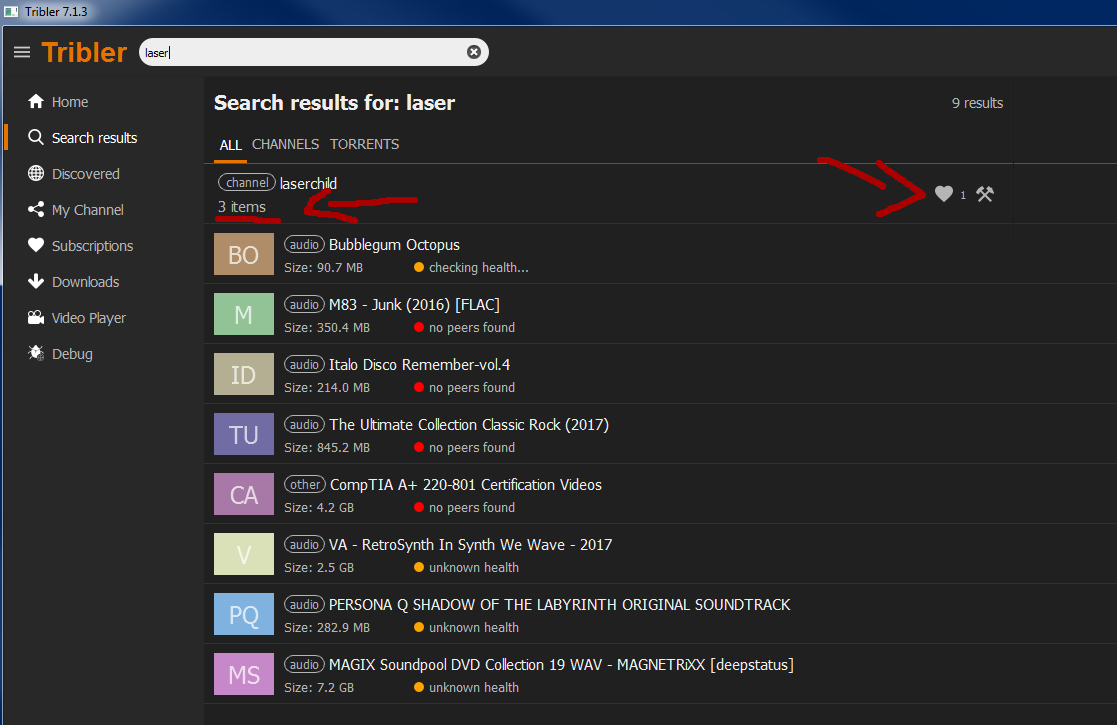
 So i guess something is going wrong here or where is my fault?
